The Countdown That Makes You Click: Urgency Is Not Evidence
A countdown timer is not proof of a real deadline. Learn how to check the claim, compare your options, and decide without pressure.
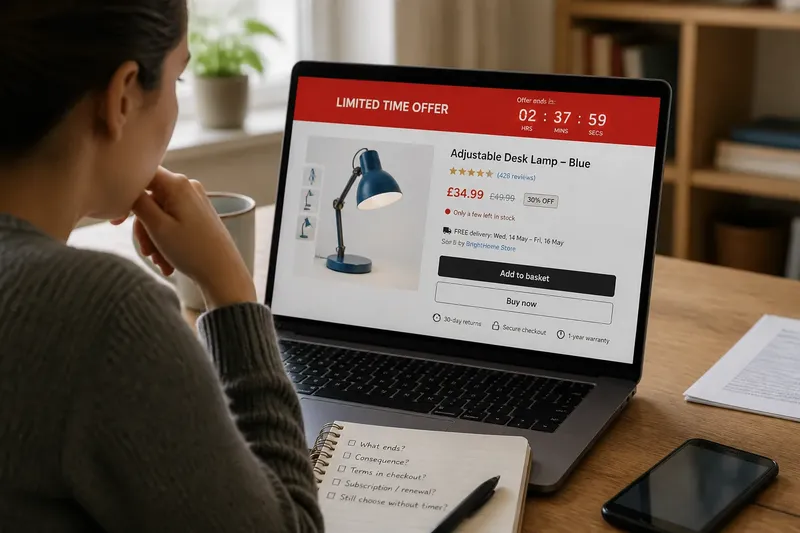
Is that countdown timer a real deadline, or a design cue meant to hurry you? A countdown timer alone is not evidence that an offer will end when it reaches zero. Before you click, check what the page actually claims, what happens when time runs out, and whether you have a reasonable way to verify the terms.
Does a countdown timer prove the deadline is real?
No. A timer shows that an interface is displaying a countdown; it does not establish who set the deadline, what event it refers to, or whether the offer will change afterward. The clock may correspond to a genuine sale window, a session limit, a delivery cutoff, or a promotional prompt with no clear consequence.
Look for a specific claim beside the timer. “Order by this time for delivery tomorrow” is different from “deal ends soon.” The first makes a promise about a delivery option. The second signals urgency without telling you what changes or when.
Even a precise-looking clock does not settle the question. A timer can restart after a refresh, reset in another browser, or appear again on a later visit. Those behaviors are reasons to examine the offer more closely, not proof by themselves that the seller is acting dishonestly. The useful question is whether the page explains a deadline in terms you can check.
What should I check beside the timer?
Read the surrounding text before interacting with the button. Identify the offer, the deadline, and the consequence of missing it. Then look for the same terms outside the countdown panel: product details, checkout, shipping information, membership terms, or the seller’s promotion page.
Check whether the claim distinguishes a limited-time price from limited stock. “Price ends tonight” refers to a price window; “only a few left” refers to inventory. Those statements need different support. A ticking clock does not confirm stock, and a low-stock message does not explain how long a price will last.
Also inspect the conditions that may change the apparent value of the offer. A discount may require a subscription, a minimum purchase, a particular delivery method, or an automatic renewal. Check the amount due now, any recurring charge, and the cancellation terms before treating a displayed saving as the whole deal.
If the page provides a named seller, contact channel, or written promotion terms, use those to clarify an ambiguous claim. A search result or social post repeating the countdown may simply reproduce the same promotion, so it is not independent confirmation.
What happens when the timer reaches zero?
That depends on the offer, and the timer may not explain it. The price could change, the item could remain available, the checkout could continue, or the page could display another countdown. Do not assume any one outcome unless the seller states it clearly.
If the clock expires while you are reading, pause at the point where you are. Note the displayed terms, then return to the product or checkout page without submitting payment. Compare the price and conditions you see with the earlier claim. If the offer is no longer available, decide whether the ordinary price still makes sense; if it remains, the urgency cue has not established a firm cutoff.
A reset is a useful observation, but it does not reveal every reason behind the interface. A session-based promotion may behave differently from a standing sale. Focus on the decision you need to make: whether the current terms are clear and acceptable, not whether you can infer the seller’s motive from one screen.
How can I check scarcity claims?
Separate the claim into what is scarce and what the page says will happen. “Few rooms left” may concern availability for a selected date; “sale ending soon” concerns timing; “popular choice” may describe attention rather than stock. Vague prompts blend these ideas and make a quick click feel like the only sensible response.
Check the item or service at the exact option you want. Availability can depend on size, color, location, date, or delivery destination. A general banner may not describe the specific choice in your cart. For travel or event bookings, review the selected dates and conditions; for a product, check the variant and seller shown at checkout.
Imagine you are choosing a blue desk lamp and a page says “only a few left.” You add the blue version, open the cart, and see that the selected lamp is sold by a marketplace merchant with a stated delivery window. You compare the seller and terms, then decide whether the lamp still suits your needs at the shown price. The prompt has led you to inspect the actual item, not to treat scarcity as proof that you should buy immediately.
Should I click before checking?
Usually, there is no need to commit while the timer is running. You can take a screenshot for your own reference, open the terms in another tab, or step away and return. A screenshot records what appeared on your screen; it does not verify the claim, but it can help you compare what the page says later.
Before proceeding, ask yourself:
- What exactly is ending: a price, a booking window, stock, or something else?
- Does the page state a specific consequence when the timer expires?
- Can I find the same terms in checkout or the seller’s written conditions?
- Does the offer require a subscription, renewal, or extra purchase?
- Would I still choose this item if the countdown were not visible?
If the answers are unclear, leave the transaction unfinished and revisit it when you can read the terms calmly. If the decision concerns a substantial purchase or recurring commitment, consult the relevant written agreement or a qualified adviser where appropriate. For an ordinary purchase, a simple pause and a comparison of the total terms may be enough to decide.
Can urgency ever be legitimate?
Yes. A ticketed event can have a real sales window, a hotel room can become unavailable, and a retailer can run a promotion with a stated end time. A legitimate deadline still needs understandable terms. The presence of a real deadline does not automatically make every accompanying claim accurate, and a dramatic timer does not invalidate a clear, verifiable deadline.
Look for a specific time zone, the relevant item or service, and any conditions that affect eligibility. For a booking, check whether the quoted price applies to the selected dates and whether cancellation rules alter the decision. For a sale, look for the stated end time and confirm that the offer applies to the product you intend to buy.
Keep the scope of the claim in view. A price may expire while the product remains for sale. A booking option may disappear while other dates remain open. “This exact option may not be available later” is a narrower statement than “you will lose your chance.” The narrower claim is easier to assess and less likely to push you into an unrelated choice.
What if the page uses several pressure cues?
When a countdown appears alongside a low-stock alert, a pop-up, and a brightly colored purchase button, treat each message as a separate claim. Visual intensity is not corroboration: several elements on one page may all come from the same promotional system.
Close or dismiss interruptions if the page allows it, then read the offer without the pop-up covering the terms. Move through the product details and checkout in order, stopping before payment. If the terms disappear when you close a prompt, look for the seller’s help or policy pages rather than accepting an unclear condition under pressure.
Urgency can also make comparison feel like a risk. If you can, check whether the same product is listed by the same seller elsewhere on the site, or whether another option meets the same need. Compare the full terms, including delivery, returns, and recurring charges, rather than just the headline price. If the offer only seems attractive while the clock is visible, that is a reason to slow down.
How do I decide without the pressure?
Make the purchase decision on its own merits: does the item fit your need, are the terms clear, and is the total commitment acceptable? A countdown timer should not answer those questions for you. If the deadline is documented and matters to your choice, include it as one piece of information; if it is vague, do not let it stand in for evidence.
For a practical check, write down the claim in plain language, such as “this price ends at the stated time,” then identify where the page supports it and what will change. If you cannot fill in those details, the claim remains uncertain. You can still choose to buy, but make that choice because the offer suits you, not because an interface has made waiting feel impossible.
The next time you see a countdown timer, treat the urgency prompt as a question to inspect, not a command to obey. Read the claim, check the options, and remember that the best decision may be to continue, wait, or leave the page.