How to Read Trust Badges on Online Stores
Learn how to read trust badges on online stores by tracing each seal to its issuer, checking its scope, and deciding what it actually supports.
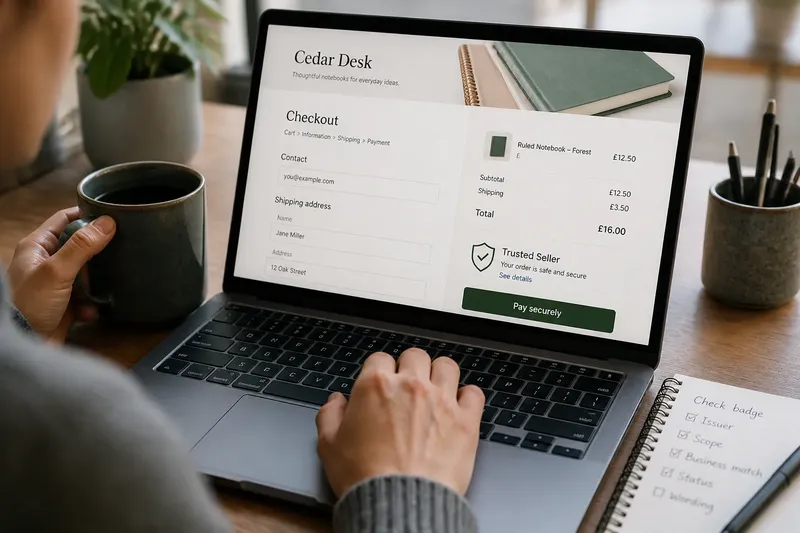
Before you enter payment details, a shield beside the checkout button may make you pause—or feel reassured. To read trust badges on online stores, check who issued the mark, what it covers, and whether the claim matches the seller in front of you.
Badges on store pages
Online stores use badges to make claims visible where a visitor is deciding whether to create an account or place an order. A mark might refer to a payment service, a trade association, a privacy program, or a defined review. Those are different claims, even when each uses a shield, check mark, or ribbon.
Badges borrow a visual convention older than online shopping: a recognizable emblem can point to a maker, organization, or authority behind a claim. On a website, the same compact design fits beside forms and purchase buttons. But the emblem’s appearance does not establish who issued it or what that party stands behind.
That distinction is easy to miss. A mark placed beside a payment button can look like an endorsement of the whole store, even if it concerns only a payment provider. Several marks together may look like separate approvals, but their number and placement do not explain their backing.
Issuer and scope
Start by looking for a named issuer: an organization, program, or service that can explain the mark. Then open the badge if it is clickable. A useful destination should identify the issuer and describe the claim; a decorative image or vague “verified” label leaves the backing unclear.
Read the scope before drawing a conclusion. Ask whether the mark concerns the seller, the website, a specific technical service, or a limited policy. Check that the business or domain named by the issuer matches the store you are visiting. If the program provides a current status or listing, confirm that it still applies.
Words such as “member,” “certified,” “verified,” and “protected” are not interchangeable. Membership may identify an association relationship; certification may refer to stated criteria; verification may concern a limited check. Use the issuer’s explanation, not the reassuring tone of the label, to determine what is being claimed.
Trust badges on online stores: what should you check?
Does a badge prove the seller is safe?
No. A badge can point to a limited service or review, and it does not by itself establish that every seller practice is trustworthy. Check the issuer and the stated scope before deciding what the mark supports.
What if the badge does not open?
If a badge is not clickable, look for the program name elsewhere on the page or search for the issuer independently. If you cannot identify an accountable issuer and a clear explanation, treat the mark as decoration rather than evidence.
Can a genuine badge still give the wrong impression?
Yes. A real mark can be positioned or described so that it appears to cover more than its program actually does. Compare the store’s wording with the issuer’s explanation and limit your conclusion to the narrower claim.
Does a missing badge mean a store is untrustworthy?
No. Its absence does not settle whether a store is trustworthy. Assess the specific claims and information available instead of treating a seal as the deciding factor.
Checks and decisions
- Check the issuer. If a named organization or service is present, look it up or open its linked explanation; if none is identifiable, do not treat the badge as an accountable endorsement.
- Check the destination. If the badge opens an issuer-controlled page that explains the mark, read it; if it opens an unrelated page or nowhere useful, set aside the implied assurance.
- Check the scope. If the claim covers only payments, privacy, membership, or a specific review, apply it only to that subject; if the scope is missing, do not extend it to the whole store.
- Check the named business. If the issuer’s listing matches the store’s name or domain, continue evaluating that specific claim; if it names a different business, do not transfer the endorsement.
- Check the status. If the issuer displays a current status or listing, use that information; if it appears outdated or cannot be confirmed, treat the badge as unverified.
- Check the wording. If the store’s description matches the issuer’s terms, keep your conclusion within those terms; if the store implies broader approval, rely on the narrower issuer description.
A checkout decision
Say you are considering an invented online shop called Cedar Desk that sells notebooks. Its checkout shows a “trusted seller” shield. You click it and land on a page naming a payment service, not Cedar Desk, with an explanation limited to payment processing. You then search for the issuer’s listing and find no entry for Cedar Desk. The result is a narrow decision: the mark may describe the payment service, but it does not verify the seller. You can continue assessing the store using other information, or stop if the remaining uncertainty is unacceptable.
When a badge appears on a store page, use it as a prompt to inspect a claim, not as a substitute for that inspection. The useful question is not whether the emblem looks official, but whether its issuer can explain a specific claim that matches the business and service you are considering.